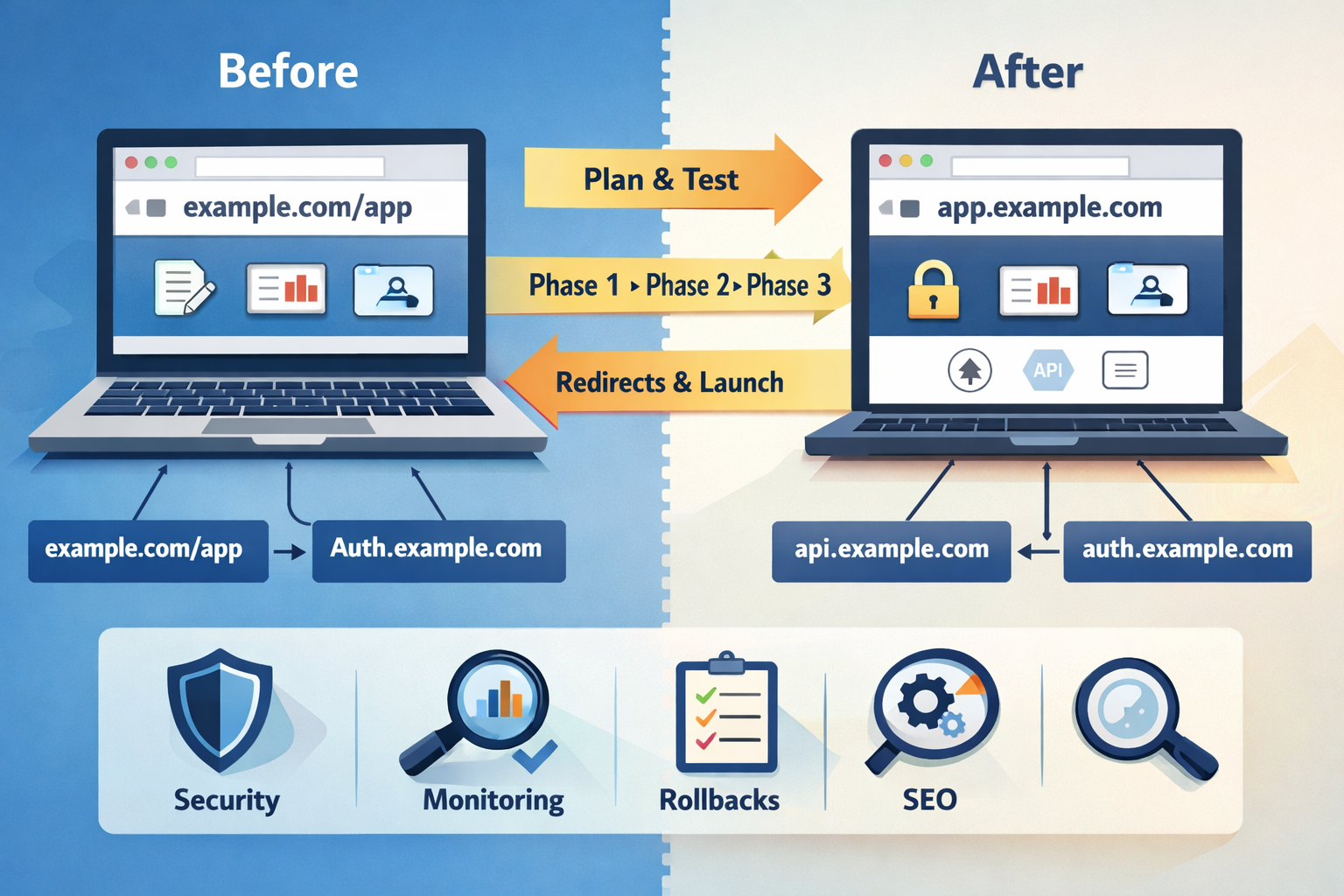
From /app to app.: A Safe, Phased Migration to a Dedicated Subdomain
Table of Contents
Migrating a web app from a path-based URL (example.com/app) to a dedicated subdomain (app.example.com) sounds simple—until you touch authentication, routing, and API boundaries. The good news: with a deliberate plan and a phased rollout, it can be low-risk—even boring.
This post outlines a practical approach that worked for us, distilled into phases, traps to avoid, and a reusable checklist.
This approach is especially useful for SaaS products, dashboards, and SPAs that rely on hosted authentication providers and API-driven backends.
1) Why migrate from /app to app.
Path-based apps are convenient early on: fewer DNS records, one CDN distribution, and a simple mental model. But as a product grows, the subdomain approach is usually cleaner:
- Clear separation of concerns: marketing vs. product UI is easier to reason about.
- Security posture: distinct headers, CSP, and caching policies can be applied per surface.
- Performance: you can tune caching and origin behavior specifically for the app.
- Operational flexibility: independent deployments, rollbacks, and testing on the app side without touching marketing pages.
- Future-proofing: subdomain boundaries make it easier to add app-specific frameworks, deployments, or even a new CDN distribution later.
The migration is mostly about reducing coupling—between your app and your public site, between your routing and your content storage, and between your auth and your domain model.
2) The hidden traps
These are the issues that turn a “simple DNS change” into a week-long firefight.
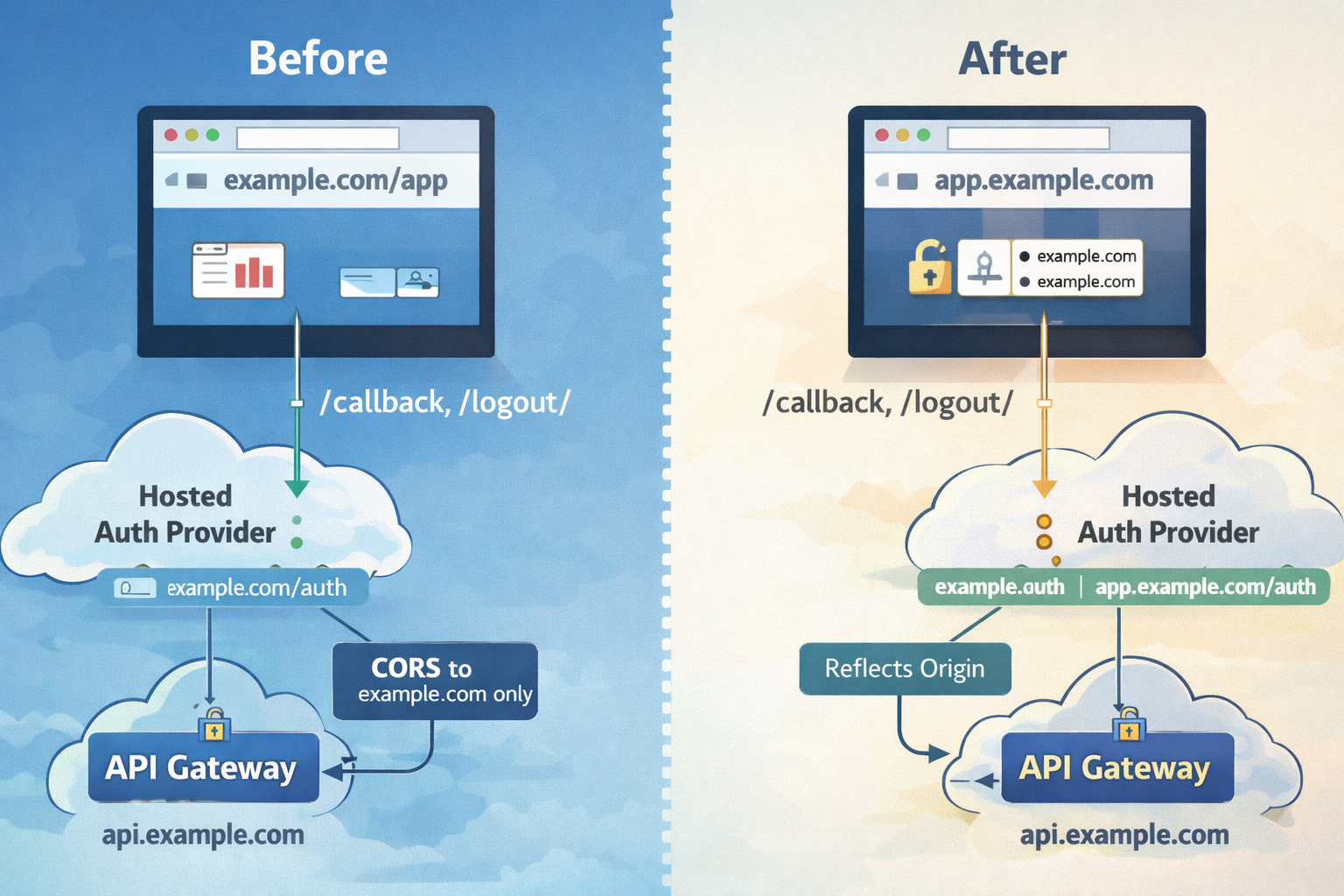
Auth callbacks and CORS are usually the first things to break when moving from a path-based app to a subdomain.
Auth callbacks and logout URLs
Hosted auth providers expect whitelisted callback and logout URLs. When you move from example.com/app to app.example.com, those URLs must be explicitly updated:
https://example.com/callback/→https://app.example.com/callback/https://example.com/logout/→https://app.example.com/logout/
If you forget this, you’ll get vague “invalid request” or “redirect mismatch” errors after login.
Cookies and session isolation
Subdomains are a different cookie scope. If you store auth tokens in cookies scoped to example.com, they don’t automatically carry to app.example.com. This is often desirable, but you must expect re-authentication on first visit to the subdomain.
CORS and API origin logic
If your API lives on api.example.com, you’ll need to allow multiple UI origins during the transition. This means:
- Your API gateway and backend must accept an allowlist of origins.
- Your responses should echo the requesting Origin and set
Vary: Origin. - Any “single-origin” logic (for example, a hardcoded
ALLOW_ORIGIN) must become list-aware.
SPA routing and edge rewrites
Single-page apps require index.html rewrites for app routes. When you move from /app/... to /... on a subdomain, you’ll likely need new rewrite rules or edge functions. Otherwise, refreshes on routes like /billing will 404.
Redirects and hash fragments
Redirecting /app/... to app.example.com/... should preserve the path and query. But hash fragments (#) are client-side only and never reach the server—so they can’t be preserved by a redirect. If your app relies on hashes for routing, the user may land on a base route instead of a deep link. Prefer path-based routing on the app if possible.
3) The phased rollout strategy
A phased migration turns a risky cutover into a controlled sequence of low-risk changes.
Phase 0 — Hard readiness gate (no code)
Goal: Make the plan unambiguous before any changes.
- Identify source-of-truth for app UI assets.
- Lock the final app URL:
https://app.example.com/(root, not/app). - Confirm DNS ownership.
- Decide certificate and WAF strategy.
- Confirm API and auth base URLs will be explicit.
Phase 1 — Parallel infra definition (no traffic)
- Create a new CDN distribution and storage origin for the app.
- Wire WAF and logging.
- Prepare a preview hostname like
app-preview.example.com. - Define CSP for API and auth domains.
Phase 1.5 — Preview deployment (no public cutover)
- Deploy to preview hostname.
- Allow preview callbacks and logout URLs.
- Add preview origin to CORS allowlist.
- Verify full user flows.
Phase 2 — Dual-origin support (no redirects)
- Allow callbacks/logout on the app subdomain.
- Expand API CORS allowlist.
- Switch UI config to explicit API/auth bases.
- Deploy app to the subdomain.
Phase 3 — Soft migration (no hard redirects)
- Update marketing CTAs to
app.example.com. - Optionally prompt users to switch.
- Monitor traffic and errors.
Phase 4 — Redirect cutover
- Add edge redirect
/app/* → app.example.com/*. - Start with 302, promote to 301 after stability.
Phase 5 — Decommission
- Remove
/appbehaviors and rewrite rules. - Remove legacy assets after redirects are permanent.
- Remove preview DNS and allowlist entries.
4) Redirect strategy: 302 → 301
- 302 first: safer rollback, avoids cached mistakes.
- 301 later: permanent signal to browsers and search engines.
Hash fragments are not preserved during redirects, which is why path-based SPA routing migrates more cleanly.
5) Security posture: TLS, WAF, headers
- Prefer TLS 1.3 if your clients allow it.
- Reuse WAF where possible for parity.
- Use explicit CSP rules for API and auth domains.
- Enable CDN access logs for visibility.
6) Observability + success criteria
- App CDN 4xx/5xx rate (spikes = broken routing or cache issues)
- API CORS errors
- Auth callback failures
- Business-critical flows (checkout, uploads)
- Traffic share on app subdomain vs.
/app
7) What we’d do differently next time
- Plan first, implement later.
- Never derive API/auth URLs from
window.location.origin. - Always use a preview hostname.
- Version configuration aggressively.
- Use two-step redirects.
8) Reusable checklist
Planning
- Asset source-of-truth
- Final URL shape
- Cert + WAF decisions
- Rollback points
Preview
- Preview hostname live
- Auth + CORS validated
Cutover
- CTAs updated
- 302 → 301 redirect
Cleanup
- Remove legacy paths
- Remove preview infrastructure
ASCII diagram: old vs new flow
OLD (path-based)
Browser → CDN (example.com) → /app/* rewrite → App UI
                 └────────→ /api/* → API gateway → services

NEW (subdomain)
Browser → CDN (app.example.com) → App UI
                 └────────────→ api.example.com → API gateway → services
Browser → CDN (example.com) → /app/* 301 → app.example.com
If you’re planning this migration, the biggest lever isn’t tooling—it’s discipline. Treat the subdomain as a parallel system, prove it under real traffic, and only then commit to redirects. Done right, this migration becomes a confidence-building exercise instead of a risky leap. A few lessons we’d bake in from day one:
- Plan-first discipline: write the migration plan before any changes. It saved us from half-finished states.
- Explicit base URLs: don’t derive API/auth endpoints from
window.location.origin. This becomes painful in multi-host deployments. - Preview by default: a preview hostname is a cheap insurance policy for auth + CORS tests.
- Cache-busting for config: inject versioned config loaders during deploys so stale config doesn’t linger.
- Two-step redirects: always start with 302 and monitor before 301.
8) A simple checklist you can reuse
Planning
- Identify UI asset source-of-truth
- Decide final app URL shape
- Lock cert and WAF strategy
- Document rollback points
Preview
- Deploy to
app-preview.example.com - Add preview callbacks/logout
- Add preview to CORS allowlist
- Validate end-to-end flows
Dual-origin
- Deploy
app.example.com - Make API/auth bases explicit
- Confirm both old and new URLs work
Cutover
- Update CTAs to app subdomain
- 302 redirect
/app/*→ app subdomain - Monitor and then switch to 301
Decommission
- Remove
/appbehaviors and rewrite rules - Remove preview DNS and allowlists
- Remove
/appassets from apex bucket
ASCII diagram: old vs new flow
OLD (path-based)
Browser → CDN (example.com) → /app/* rewrite → App UI
└────────→ /api/* → API gateway → services
NEW (subdomain)
Browser → CDN (app.example.com) → App UI
└────────────→ api.example.com → API gateway → services
Browser → CDN (example.com) → /app/* 301 → app.example.com
If you’re planning this migration, the biggest lever is discipline: plan first, implement in phases, and make rollbacks explicit. Treat the new subdomain as a parallel system until it proves itself. You’ll ship faster, break less, and have far fewer surprise nights debugging auth callbacks.